Updated: 06/25/2025 by

Also called a backward slash, downward slash, and reverse solidus, the backslash is a character ( \ ) introduced by Bob Bemer in 1960.
Note
Although "slash" often describes the forward slash, it can describe either a forward slash or backslash. It's better to say "backslash" or "whack" instead of "slash" when telling someone to enter a backslash.
Tip
Early typewriters and computer keyboards only had a forward slash. The backward slash was not made popular until MS-DOS started being used.
Where is the backslash key on the keyboard?
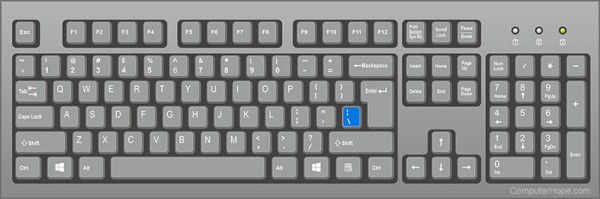
Below is an overview of a US QWERTY computer keyboard with the backslash key highlighted in blue. It is also not uncommon for this key to be directly below the Backspace key and above the Enter key.
Note
On a UK QWERTY keyboard the backslash key is on the bottom row and to the left of the letter "Z."
How to create a backslash
Creating the \ symbol on a U.S. keyboard
On English PC and Mac keyboards, the backslash key is also the pipe key. It is located above the Enter key (Return key) and below the Backspace key. Pressing \ creates a backslash.
Tip
Doing the Alt code Alt+92 can also create a backslash.
Creating the \ symbol on a smartphone or tablet
To create a backslash symbol on a smartphone or tablet, open the keyboard and go into the numbers (123) or symbols (sym) section and tap the \ symbol.
What is a backslash used for on a computer?
A backslash can represent a file path in MS-DOS (cmd), PowerShell, and Windows. For example, C:\Windows is an example of the backslash being used. A backslash may also be used for any of the following reasons.
The backslash is used as an escape character. A file and directory separator in a file path. A networked computer or folder in a network path.What is the other symbol on the backslash key?
On U.S. keyboards, the backslash key is shared with the pipe key, which may be next to or above the backslash symbol. To create the pipe, hold down Shift while also pressing \ (backslash) key.
Escape character, Forward slash, Keyboard terms, Path separator, Slant, Slash, Typography terms