VS Code
使用VS Code编写代码编辑器:Visual Studio Code教程 #生活技巧# #工作学习技巧# #编程学习资源#
Visual Studio Code is a source code editor. It is extensible, free, open-source, and cross-platform. It owes much of its success to its active community of extension developers. Whenever it lacks a certain feature, there is usually an extension to fix that shortcoming. Its out-of-the-box Markdown support includes:
CommonMark support Syntax highlighting Preview Autocompletion Themes Code styleIt does not support WYSIWIG editing. While Visual Studio Code does not come with out-of-the-box ability to export Markdown to any other formats, it can copy Markdown code with syntax coloring intact.
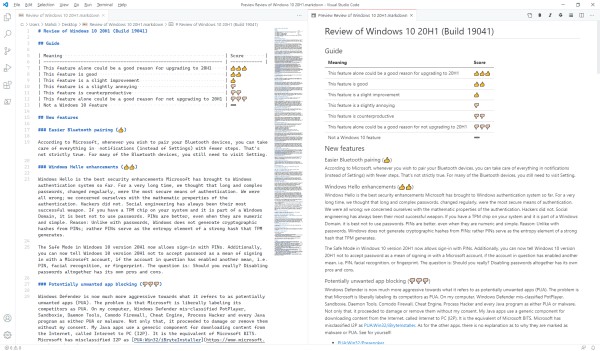
Markdown extensions available in the Visual Studio marketplace extend it with the following features:
Extended syntax (e.g. “Markdown Extended”) Markdown code formatting (e.g. “Prettier - Code formatter”) Exporting to other formats (e.g. “Markdown Preview Enhanced”) UI elements (e.g. “Markdown Shortcuts”) Extended markdown syntax highlighting (e.g. “One Dark Pro”) Linting (e.g. “markdownlint”) – It is a feature for developers but a huge annoyance for ordinary writers Style-compliance kits for different services (e.g. “Docs Authoring Pack” for Microsoft Docs) Spelling check (e.g. “Code Spell Checker”)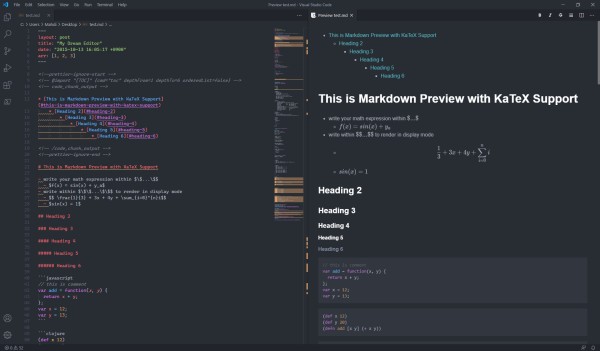
VS Code Markdown Support
VS Code provides support for the following Markdown elements.
Element Support Notes Headings Yes Paragraphs Yes Line Breaks Yes Bold Yes Italic Yes Blockquotes Yes Ordered Lists Yes Unordered Lists Yes Code Yes Horizontal Rules Yes Links Yes Images Yes Image display in preview is subject to content security policy, adjustable from the drop-down menu to the top-right Tables Yes Fenced Code Blocks Yes Syntax Highlighting Yes Footnotes Partial In code editor only. Comprehensive support requires the Markdown Preview Enhanced extension. Heading IDs Partial Does not support custom IDs. Comprehensive support requires the Markdown Preview Enhanced extension. Definition Lists Partial Requires the Markdown Preview Enhanced extension. Strikethrough Partial Two tildes (~~word~~) only. Task Lists Partial One of the many readily available extensions can add this feature, e.g. Markdown Preview Enhanced. Emoji (copy and paste) Yes Emoji (shortcodes) Partial Requires the Markdown Preview Enhanced extension. Highlight No Subscript No Superscript No Automatic URL Linking Yes Disabling Automatic URL Linking Yes HTML YesSee Also
Visual Studio Code repository on GitHub
Learn Markdown in 60 pages. Designed for both novices and experts, The Markdown Guide book is a comprehensive reference that has everything you need to get started and master Markdown syntax.
Get the Book
Want to learn more Markdown?Don't stop now! Star the GitHub repository and then enter your email address below to receive new Markdown tutorials via email. No spam!
网址:VS Code https://klqsh.com/news/view/233240
相关内容
在 Windows 上使用 Visual Studio CodeDocumentation for Visual Studio Code
Microsoft account recovery code
Generating Code for State Machines
Code综艺圈
Generate QR Code for URL for Free
Did the Twin Towers have their own zip code? – MassInitiative
Generate production quality code from state diagrams created with Enterprise Architect
ZIP Code 98053 Info, Map, Demographics for Redmond, WA
VSCode 教程
随便看看
最新乐趣
- 我们老鼠是个好妈妈
- 内娱终于完整拍出和亲公主的故事了,这女主人设看着就墨雨云间那个疯批公主
- roha的pawpaw小舞蹈
- 阳光快乐崔秀彬, 就这样蹦蹦哒哒闯入视线
- 魏娆凭借机智再次躲过了危机,原来她早就跟那妇人通了气 !
- 《红秀》主编否认给白鹿买高定拍封面:我用买吗?
- 甄嬛传小主们还原名场面
- 樊振东获赞言有尽而意无穷
- 明楼是老绷带了,怪不得一个人能卧底五份工作 伪装者
- 兰香如故:大姐姐恳求二太太救救自己,如今连女儿都有了应激反应
热点乐趣
- 89772
- 78086
- 64271
- 60339
- 39842
- 35873
- 32584
- 22913
- 22772
- 21581

