In case you are interested, it is possible to use WhatsApp on the large screen of your laptop or desktop computer by making use of WhatsApp Web, without the need to download and install any software on your computer.
All that is required to use WhatsApp Web on PC or Mac is to visit WhatsApp’s website and scan a QR code using the rear-facing camera of any mobile device (iPhone or Android phone).
Once the QR code is successfully scanned, you will find all your WhatsApp messages and in-fact your entire WhatsApp Account on the screen of your computer.
As you must be already aware, the web version of WhatsApp basically allows you to use your existing WhatsApp mobile Account on a Windows computer or Mac.
Advertisement
This means, it is necessary to have a WhatsApp account on iPhone or Android phone, in order to use WhatsApp Web on a computer.
Steps to Use WhatsApp Web on PC & Mac
If you have a WhatsApp account on mobile device, you can follow the steps below to use WhatsApp Web on a Windows computer or MacBook.
1. Open the web browser on your computer and visit WhatsApp’s official WhatsApp Web page.
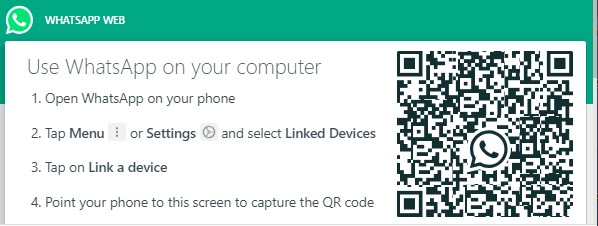
2. Once you land on WhatsApp’s official Web page, you will see a QR Code on the screen of your computer, prompting you to scan the QR Code.
3. Open WhatsApp > tap on the Settings tab in the bottom-menu.

Note: If you are using an Android Phone, tap on 3-dots icon (top-right corner).
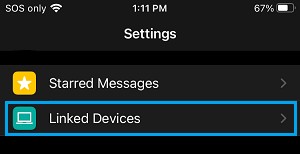
4. On WhatsApp Settings screen, tap on Linked Devices.
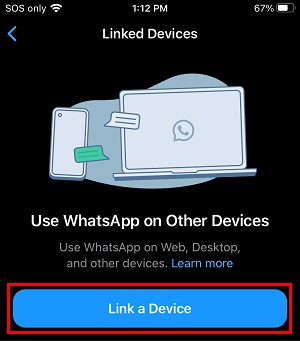
5. On the next screen, tap on Link a Device button and scan the QR Code using the rear-facing camera of your mobile device.
Once the QR Code is scanned, you should see all your WhatsApp Messages appearing on the screen of your computer.
This allows you to send and receive WhatsApp messages from the computer and use your WhatsApp, just like you do on your iPhone or Android Phone.
Advantages of WhatsApp Web
1. It is faster to type on a full scale keyboard of the computer, compared to typing on a mobile device.
2. It allows you to use WhatsApp with the full processing power, memory and speed of a laptop or desktop computer.
3. It allows you to download media directly to the PC, without having to worry about the storage limit.
4. It makes it easy for you to Attach Files from the computer to WhatsApp Messages.
Disadvantages of WhatsApp Web
1. You still need your mobile phone with an active WhatsApp Account, unless you make use of this workaround: Use WhatsApp on PC Without Mobile Phone.
2. It is not convenient to use Emoji’s as they are not mapped to the keyboard of the computer.
3. WhatsApp does not allow you to block users directly through the web interface. Also, you cannot change your profile picture or profile status while using WhatsApp Web.
4. WhatsApp Web interface does not allow you to start a new group chat or leave an existing Group Chat.
5. It is advisable not to use WhatsApp Web on a shared or public computer. If you do, make sure that you Logout of WhatsApp while leaving the public computer.