Honeycam
Pinnacle of GIF Makers
Honeycam
Honeycam makes and edits animated image (GIF, WebP, etc.) files with ease.Record your gameplays, YouTube highlights, and teaching materials in animated images.
Version Info: v4.31 - 2024/11/25
What you can create with Honeycam
Instagram Stickers & EmojisTurn your hand-drawings into animations using Honeycam. Make your dream of becoming an emoji artist come true with Honeycam.
Blog GIFs
Add an unique animation to your blog using Honeycam. Just one GIF can make your blog much vibrant.
Product Showcase GIFs
Enhace the product details on your online store by adding animations made with Honeycam. Deliver information at a glance and capture customer interest.
Key features of Honeycam
Easy and Quick Editing
Select only the parts you need from a video, crop or resize with powerful editing features. You can also the number of frames, playback time, and more all with ease.
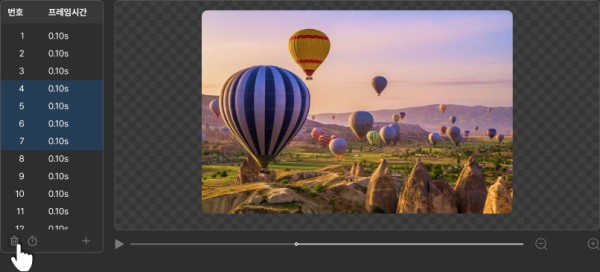
Beyond basic color correction, Honeycam offers filters like white balance (to fix pale tones), blur, mosaic, color curves, chromakey, and more.
Video CollageWith the collage feature, you can display more than one image or video at the same time. Create an unique animation filled with various visuals in one frame.
Animation in Just a few Clicks
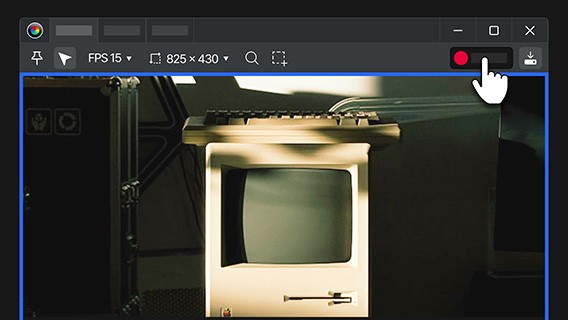
Position Honeycam where you want to record, then simply press the Record, Stop, and Save buttons. Easily and quickly caputre the important moments as your animation.
FAQs
The recording time is limited to 10 seconds in the Trial Edition. The Professional Edition offers unlimited recording time. Please note that however, Honeycam should save recorded data to RAM and a hard drive so even in the Professional Edition, there may be limitation on recording time depending on the available storage space on the computer. Learn more
You can significantly reduce the file size of your animation by converting the file format to WebP or adjusting its quality, frame rate, and image resolution. To reduce file size without quality loss, try using the "Skip similar images" feature. Hoenycam also calculates and shows the estimated file size before saving. Learn more
Honeycam does not provide audio recording or editing features. Videos recorded with Honeycam do not include sound, and if you edit a video with sound in Honeycam, the sound will be removed.
OS
Windows 10, 11 (64-bit)
Version Info
v4.31 - 2024/11/25
网址:Honeycam https://klqsh.com/news/view/358711
随便看看
最新乐趣
- 年少的欢喜总是以遗憾收场 神雕侠侣 毛晓彤 陈晓 微博二创视频创作季
- 执仇恨,燃战魂,《念无双》郦朝央的悲情复仇绝唱
- 恭喜!TVB资深男星自曝当爷爷,独自将儿子养大,被力挺拿视帝
- 丁春秋苦修大成化功大法,覆灭全真,转眼便要血洗少林寺
- 这段拍得好美啊,完全是兰香眼中的大爷,是心动的信号兰香如故
- 校地携手重游大观园红楼梦时尚秀演在张家湾古镇启幕
- 宠妻狂魔宣夜:砍价是本能,买单是义务
- 《折腰》魏劭实锤惧内!上一秒:我保你!下一秒:你给我跪下!
- 男人因失恋冲动求婚胖女孩,结果被对方宠上天
- 洞房花烛夜,王妃很紧张,然而王爷并不打算做什么
热点乐趣
- 89576
- 77792
- 64147
- 60093
- 39738
- 35388
- 32217
- 22649
- 22311
- 21360